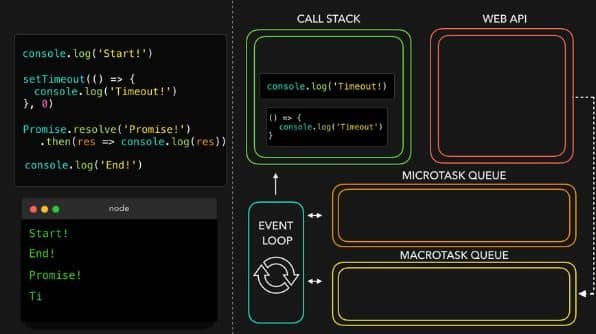
Microtasks Javascript
Have you ever wondered how JavaScript keeps your applications running smoothly without freezing up the user interface? One key player in this aspect is the concept of microtasks.
Understanding microtasks can significantly enhance your programming skills and improve your application’s performance. Let’s explore microtasks in JavaScript.
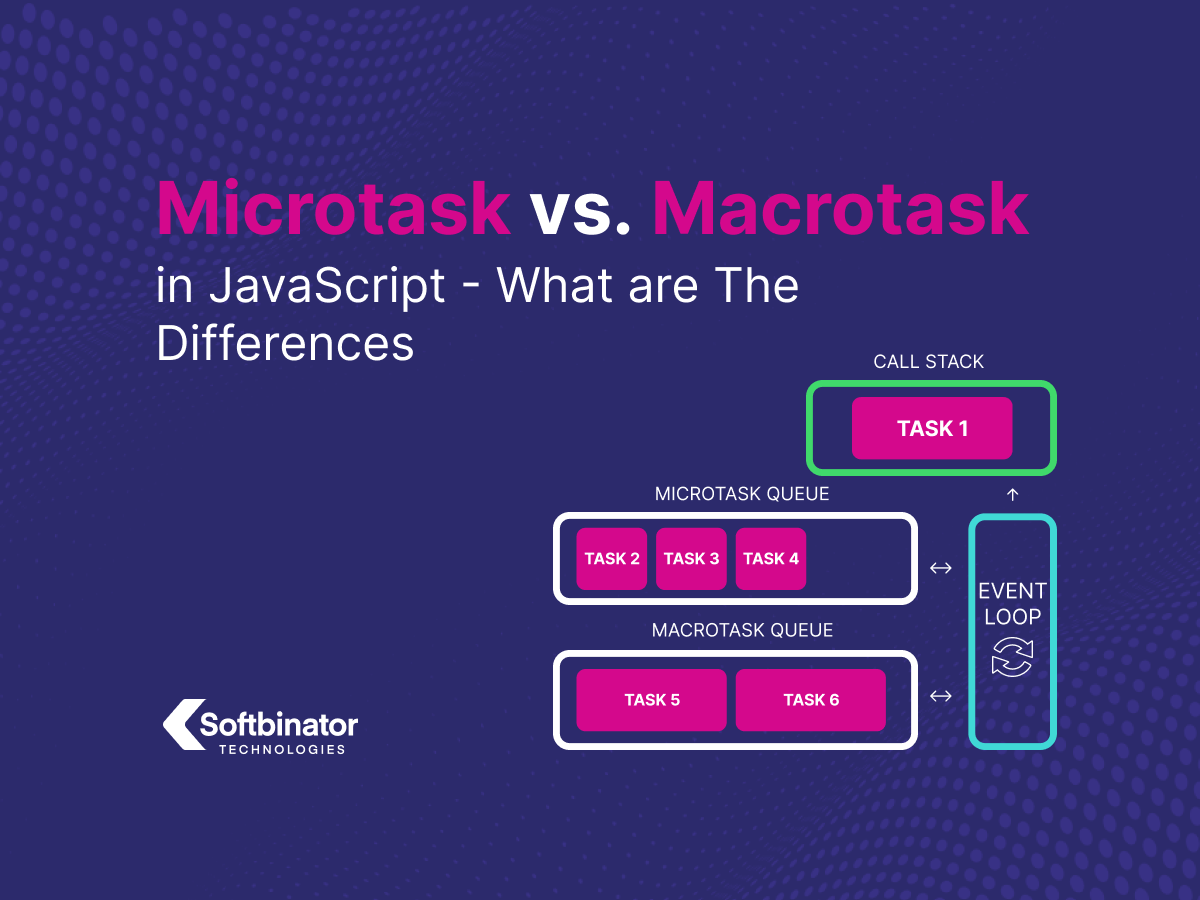
What Are Microtasks?
Microtasks are specific tasks in JavaScript that can be executed after the currently executing script and before the next rendering event.
Microtasks are part of JavaScript’s broader task-scheduling mechanism, which is crucial for asynchronous programming. They are smaller tasks that are processed efficiently, allowing other parts of the application to remain responsive.
The Event Loop and Task Queue
To understand microtasks, it’s essential to grasp how the JavaScript event loop operates. The event loop enables JavaScript to perform non-blocking operations.
The Main Components:
- Call Stack: This is where the execution of your JavaScript code happens.
- Web APIs: Functions provided by the browser or runtime (like timers or AJAX calls) that handle asynchronous operations.
- Task Queue: This holds tasks waiting to be executed when the call stack is empty.
- Microtask Queue: A specific queue for microtasks with higher priority than the task queue.
Here’s a simple breakdown of how these components work together:
| Component | Description |
|---|---|
| Call Stack | Executes the currently running script. |
| Web APIs | Handles asynchronous actions, like network requests. |
| Task Queue | Holds tasks to be executed after the call stack is clear. |
| Microtask Queue | Holds microtasks that are processed before the following rendering. |
How Microtasks Differ from Macrotasks
You’re probably asking yourself how microtasks relate to microtasks. In JavaScript, macrotasks include setTimeout, setInterval, and DOM events. Microtasks, by contrast, are often used with promises and other async operations.
- Execution Timing: Microtasks are processed before the following rendering and after the currently executing script is completed. Macro tasks are handled afterward.
- Use Cases: Microtasks are ideal for operations that need to be completed before a screen update or message is displayed, like promise resolution. Macro tasks are better for delays or periodic actions.
The Promise of Microtasks
Promises are the most common microtasks used in JavaScript. When you create a promise using the Promise constructor, you can attach callbacks that will execute when the promise is either resolved or rejected.
let promise = new Promise((resolve, reject) => { // Simulate a future value setTimeout(() => resolve(‘Success!’), 1000); });
promise.then(value => { console.log(value); // This executes as a microtask });
In this example, the then callback runs as a microtask once the promise resolves, even before the next rendering happens. This ensures your application remains responsive while waiting for asynchronous operations.
Understanding the Microtask Queue
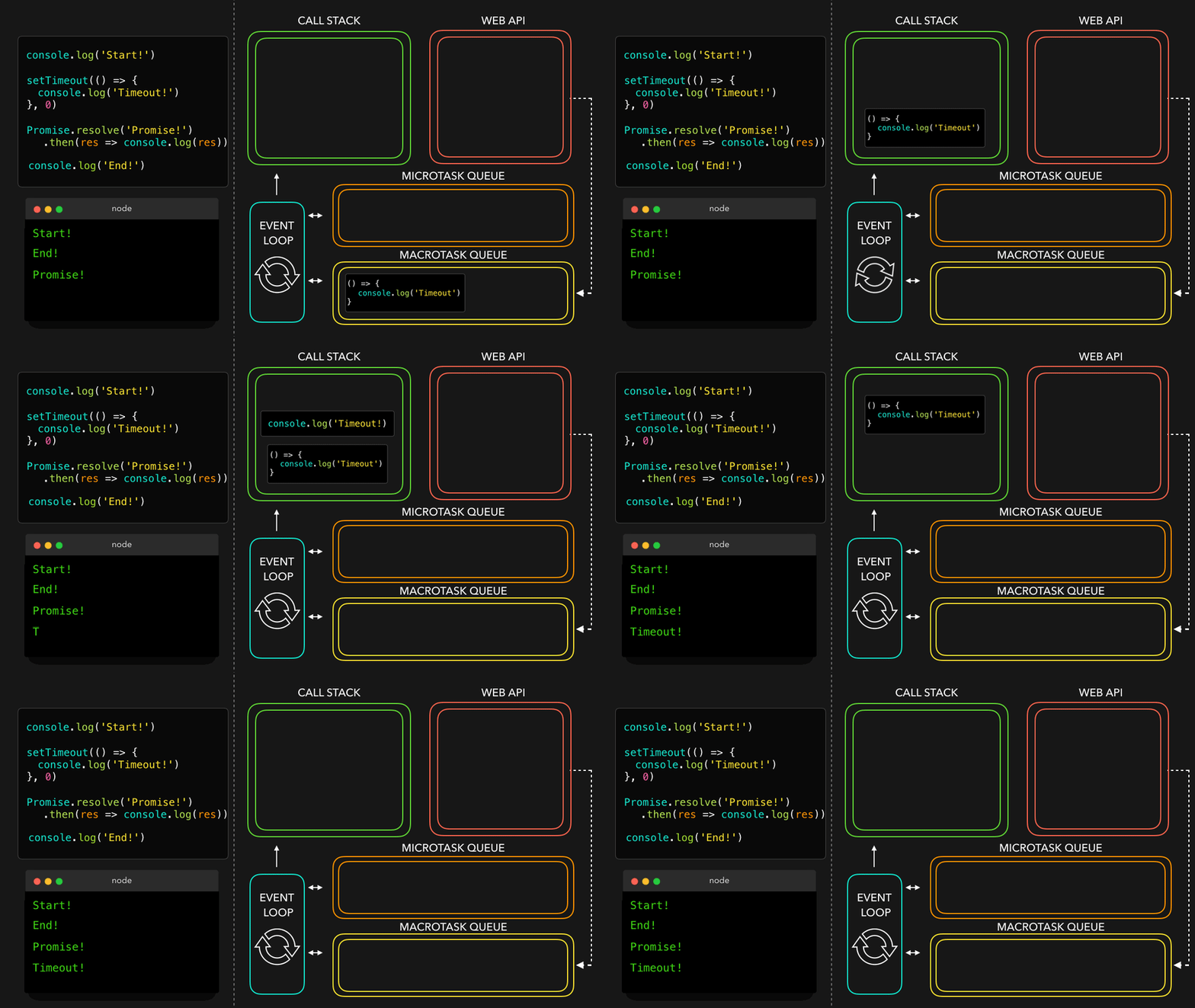
The microtask queue is the particular queue where all microtasks are collected. When the JavaScript engine finishes executing the current stack, it checks the microtask queue. If there are tasks in the queue, they are executed individually until the queue is empty.
Example of Microtask Execution:
console.log(‘First’); // Main task
Promise.resolve().then(() => { console.log(‘Second (Microtask)’); // Microtask });
console.log(‘Third’); // Main task
In the code above, the output order will be:
- First
- Third
- Second (Microtask)
This shows how microtasks can be executed immediately after the main tasks, ensuring you can handle promises efficiently.
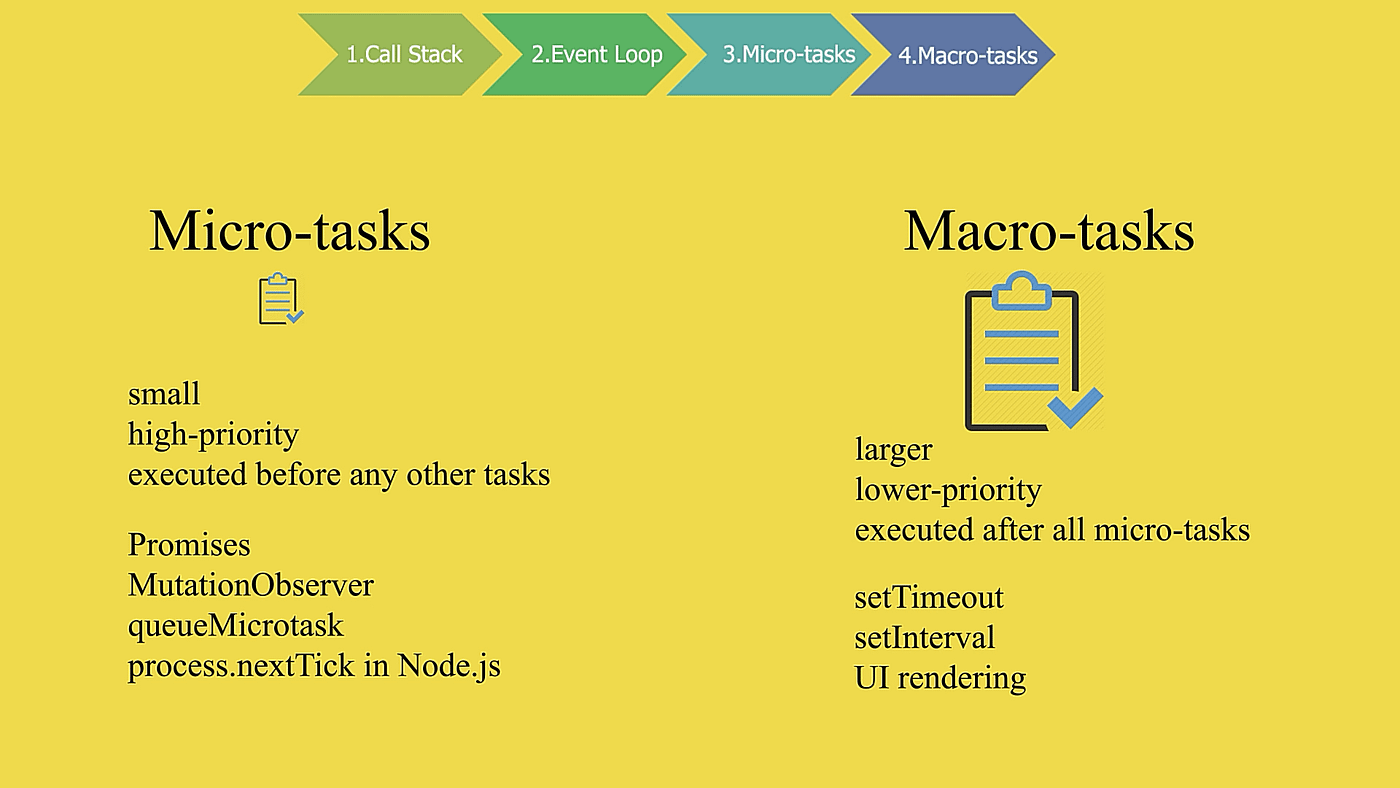
When to Use Microtasks
Microtasks are most beneficial when you must perform some actions right after changes but without outside interference. Here are some everyday use cases:
Promises
As discussed earlier, they are the primary reason microtasks exist. When you use promises, you’re working with a future value, and microtasks allow you to handle that value efficiently without delaying the user interface.
Mutation Observers
Another excellent use case is with Mutation Observers, which can react to changes in the DOM. The callbacks for mutation observers are executed as microtasks, ensuring that you can react quickly to changes in your web application’s underlying structures.
Async/Await
With the introduction of async functions in JavaScript, microtasks became even more crucial. When you use await, the function pauses execution, but after the awaited promise resolves, it resumes in a microtask.
async function fetchData() { const data = await fetch(‘https://api.example.com’); console.log(data); // This runs as a microtask }
This mechanism allows you to handle asynchronous code more efficiently, making your code easier to read and maintain.

Performance Considerations
While microtasks are incredibly powerful, overusing them can lead to performance issues. Since microtasks are executed before rendering, they can block the rendering process if they take too long to complete, causing UI jank.
Best Practices
- Limit Microtask Usage: Use them judiciously. Executing them before rendering is excellent, so don’t crowd the queue with too many microtasks.
- Batch Operations: If you have multiple microtasks to perform, batch them together instead of creating a separate microtask for each operation.
- Testing Performance: Use performance testing tools to analyze how microtasks impact your app’s responsiveness, especially in high-load scenarios.

Error Handling in Microtasks
Proper error handling is essential in microtasks, which may not throw errors in the traditional sense. When a microtask throws an error, it can cause the whole application to crash if it is not handled properly.
Catching Errors in Promises
Fortunately, promises provide a neat way to handle errors through the catch method.
Promise.reject(new Error(‘Oops!’)) .catch(err => { console.error(err); // This handles the error properly in a microtask });
With the .catch method, any error thrown in the promise chain is caught, and you can handle it gracefully, allowing the rest of your application to function smoothly.
Error Handling in Async/Await
If you’re using async/await, surround your code with try...catch blocks to catch any errors within the awaited promise.
async function fetchData() { try { const response = await fetch(‘https://api.example.com’); const data = await response.json(); console.log(data); } catch (error) { console.error(error); // Gracefully handle errors } }
This approach gives you control over the flow of your program, allowing you to manage errors effectively.
Understanding microtasks in JavaScript is essential for anyone looking to master asynchronous programming.
Leveraging promises and the microtask queue can ensure your applications remain responsive and efficient. However, use them wisely to avoid performance pitfalls like any powerful tool.
As you’ve learned, microtasks are a crucial aspect of the JavaScript event loop. They allow you to execute smaller tasks efficiently and without blocking the user interface.
By knowing when and how to implement microtasks, you can enhance the performance of your web applications and provide a seamless user experience. Happy coding!
The Power of Microtasks in JavaScript
JavaScript is a powerful scripting language that is widely used for creating dynamic and interactive web applications.
One important aspect of JavaScript programming is understanding the concept of microtasks. This blog post will explore microtasks, how they work, and why they are essential in JavaScript programming.
What are Microtasks in JavaScript?
Microtasks in JavaScript are a way of scheduling tasks to be executed asynchronously. They are used to handle promises and other asynchronous operations more efficiently and predictably. When a microtask is created, it is placed in a microtask queue, which is processed after the current execution stack is empty.
Microtasks are different from regular tasks in that they have higher priority and are executed before the next tick of the event loop. This means that microtasks are guaranteed to run before any other tasks scheduled in the event loop.
How do Microtasks Work in JavaScript?
A microtask is created in JavaScript and placed in the microtask queue. The microtask queue is processed after the current execution stack is empty and before the next tick of the event loop. This ensures that microtasks are executed in a timely and predictable manner.
Microtasks are commonly used to handle promises in JavaScript. The associated callbacks are executed as microtasks when a promise is resolved or rejected. This allows developers to write asynchronous code that is easier to read and debug.
Why are Microtasks Important in JavaScript Programming?
There are several reasons why microtasks are essential in JavaScript programming –
- Microtasks allow developers to write asynchronous, more efficient, and predictable code.
- Microtasks are prioritized over regular tasks, ensuring they are executed before other functions in the event loop.
- Microtasks are commonly used to handle promises and other asynchronous operations in JavaScript.
- Microtasks make writing code asynchronous but still easy to read and maintain.
Overall, microtasks are an important concept in JavaScript programming that helps developers write cleaner, more efficient, and more predictable code.
Microtasks in JavaScript are a valuable tool for handling asynchronous operations in a more efficient and predictable manner.
By understanding how microtasks work and implementing them in your code, you can write cleaner, more efficient, and more maintainable JavaScript code.
Next time you work on a project that involves asynchronous operations, consider using microtasks to streamline your code and make it more readable. You may be surprised at how much easier it is to manage complex asynchronous tasks with the power of microtasks in JavaScript.
Related Topics About Microtasks Javascript
C’est Quoi Javascript,
Is Javascript In Demand,
Javascript Keep Decimal Places,
Javascript Tasks Microtasks,
Javascript Tolowercase Vs Tolocalelowercase,
Javascript Usage Examples,
Javascript Use Examples,
Javascript Worker Example,
Js Microtask And Macrotask,
Microtasks In Javascript,
Microtasks Javascript,
Was Ist Javascript,
What Is Closest In Javascript
==========
Content 10/10/G